 United States
 United Kingdom
 Spain
Spain Netherlands
 Portugal
 France
Preset templates
Save time writing emails with ready-to-use templates and workflows. Easily add your branding, logos, and tone of voice for a more personal touch.

Say goodbye to chaos and discover how Credit-IQ® can make life easier with automated reminders, task management, and AR tracking
Tailor automated email workflows to match your business processes, branding, and customer location. Or start faster with pre-set templates.
.png)

Save time writing emails with ready-to-use templates and workflows. Easily add your branding, logos, and tone of voice for a more personal touch.

Credit-IQ®'s pre-set reminders are available in 8 languages. Making it easy to let your international customers know they need to pay.

Design custom workflows with actions such as phone calls and reminders for different accounts. To automate your business processes and make your team more efficient.

Automatically send final demand letters to customers who don't pay. Atradius takes over the process, giving you peace of mind and retaining customer relationships.
Credit-IQ® brings all your team's accounts receivable tasks under one roof, making managing and staying on top of payments a breeze.
.png)

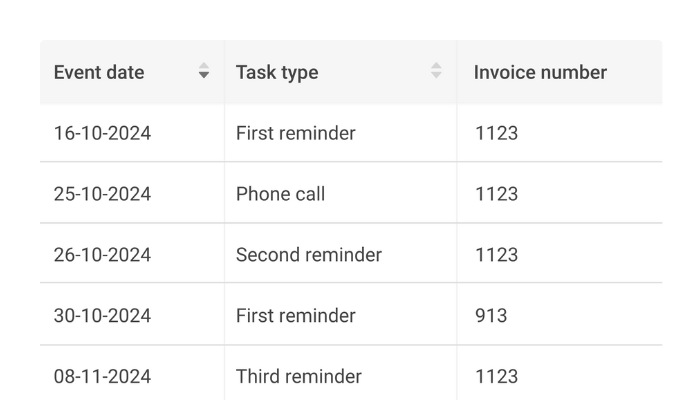
Always know what's happening and when on each account with a visual representation of scheduled activities and deadlines for you and your team.

Eliminate noise and focus on the stuff that matters to you. See what tasks you need to do and by when at a glance, helping you to have more productive days.

Assign tasks to other team members or departments, send them all the details and add a deadline, making prioritising tasks easier and completion faster.

Keep everyone on the same page by adding notes to accounts at every workflow stage. Eliminating confusion and unnecessary customer communication.
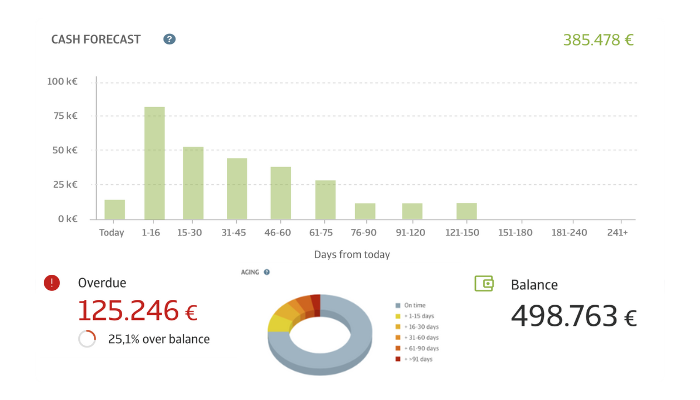
Dashboards give a bird's-eye view of your financial performance. Helping you visualize key metrics, spot trends, and identify areas to boost your cash-flow.
.png)

Effortlessly monitor the status of an account's financial standing and keep tabs on your available funds by utilizing the convenient account balance feature.

Keep track of outstanding balances on our user-friendly dashboards to ensure timely collection of payments and better financial planning. Helping you to avoid any missed payments.

Keeping a record of outstanding invoices is essential to avoid financial discomfort. Credit-IQ records all unpaid invoices per account so you can take action.

Anticipate upcoming cash inflow. Credit-IQ gives you an understanding of your projected receipts to make informed decisions.
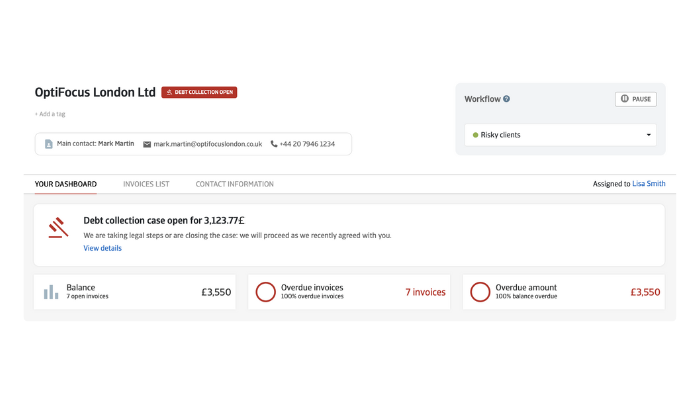
Credit-IQ® empowers you to take control of debt collection while giving you the flexibility to choose how and when to use it. With real-time insights, automation, and professional support from Atradius Collections, you'll recover overdue payments faster and with less hassle.l-
.png)

Enable the feature with ease, based on your accounts receivable strategy. Once activated, the process runs automatically.

By integrating with Atradius Collections, Credit-IQ ensures professional management of your debt collection cases. Guaranteeing efficiency every time.

Follow-up on debt collection cases in real-time. From detailed updates to case statuses provided by Atradius Collections — you’ll always have full visibility over your portfolio.

Tailor your workflows by choosing whether to include debt collection or not. Credit-IQ automatically initiates the process, taking care of the escalation seamlessly.
| Your next job | What to evaluate |
|---|---|
| Make invoice follow-up consistent | Review the message, timing and reply route in automated reminders |
| Make the next action clear | See how a colleague is assigned a task and leaves a note in centralized tasks |
| Review the receivables position | Compare a sample of open items with the AR overview |
Bring one overdue invoice and one paid or queried invoice to the discussion. Ask the team to show how your accounting data reaches the workflow and how exceptions are reviewed. Confirm your exact accounting edition, permissions and update frequency before rollout.
Discuss your AR workflow or review current US plans.
Use an illustrative go/no-go record during the evaluation: name the manual handoff you want to improve, ask to see the available action and note the setup dependency. For example, have a colleague show how an account note and next task remain visible when the usual owner is absent. Record which role can assign the task and who checks completion.
Compare that workflow with what your accounting package and existing team process already provide. If the present approach covers the need, another subscription and connection may add work without enough benefit. If the handoff remains unclear, resolve the requirement before choosing a plan. This is an evaluation method, not a demonstrated product outcome.
We have a plan that fits your needs
Includes
Includes
Includes
Includes
Includes
Includes